
Download SocialCaption – AI‑Powered Social Media Caption Generator
Overview
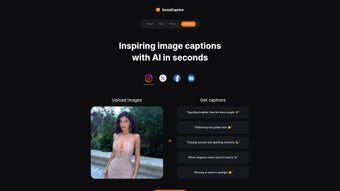
SocialCaption is an innovative AI‑driven web application that removes the guesswork from social media publishing. By allowing users to upload an image and instantly receive a curated list of caption suggestions, the tool streamlines the creative workflow for marketers, influencers, and small business owners alike. The underlying language model analyses visual elements, detects the mood of the picture, and then produces captions that are not only grammatically correct but also tuned to the tone of the target platform—whether it’s Instagram, Facebook, LinkedIn, or TikTok.
The free tier lets you generate up to five captions for three images per month, which is perfect for occasional posting or testing the service. The Pro plan removes those limits, offering unlimited caption generation, priority processing, and access to premium style presets. Because SocialCaption runs entirely in the browser, there is no need to install bulky software; a stable internet connection and a modern browser are enough to start creating high‑impact posts in seconds.
In short, SocialCaption combines the convenience of a cloud‑based SaaS with the creative depth of a dedicated copy‑writing assistant, making it a valuable addition to any social media toolkit.
Key Features
- AI‑Generated Captions: Uses state‑of‑the‑art natural language processing to produce captions that match the image context and platform tone.
- Multi‑Platform Support: Ready‑to‑use templates for Instagram, Facebook, Twitter, LinkedIn, TikTok, and Pinterest.
- Image Upload & Analysis: Drag‑and‑drop interface; the AI scans visual cues such as colors, objects, and facial expressions.
- Free & Pro Plans: Free tier supports up to three images per month with five captions each; Pro tier offers unlimited usage and premium style packs.
- Style Presets: Choose from “Professional,” “Playful,” “Inspirational,” and “Trending” to align captions with brand voice.
- One‑Click Export: Copy captions directly to clipboard or export to CSV for bulk scheduling.
- Secure Cloud Processing: All data is encrypted in transit and never stored permanently, ensuring privacy for sensitive brand assets.
- Regular Updates: The AI model is refreshed monthly with the latest linguistic trends and platform algorithms.
Installation, Usage & Compatibility
Getting Started – No Installation Required
SocialCaption is delivered as a responsive web application, so you can start using it immediately from any modern browser—Chrome, Firefox, Edge, or Safari. Simply navigate to socialcaption.io, create a free account, and you’re ready to upload your first image. Because the service runs in the cloud, there are no downloads, no installers, and no system‑level dependencies to manage.
Step‑by‑Step Workflow
- Create an Account: Sign up with an email address or use Google/Apple single sign‑on.
- Upload an Image: Drag your photo into the upload zone or click to browse files. Supported formats include JPG, PNG, and WebP up to 10 MB.
- Select a Style: Choose a preset that matches your brand voice or let the AI suggest the best fit.
- Generate Captions: Click “Generate” and wait a few seconds while the AI processes the visual data.
- Review & Refine: Browse the list of suggested captions, edit any line if needed, and copy the final version.
- Publish: Paste the caption directly into your social media scheduler or posting interface.
Operating System Compatibility
SocialCaption works across all major operating systems because it is browser‑based. Whether you are on Windows 10/11, macOS Ventura, Linux distributions, or mobile platforms such as Android 9+ and iOS 13+, the experience remains consistent. The responsive design ensures that the UI adapts gracefully to desktop monitors, tablets, and smartphones, allowing you to generate captions on the go.
Pro Plan – Advanced Controls
Users who upgrade to the Pro plan gain access to bulk image upload, API endpoints for integration with social media management tools, and priority processing that reduces generation time to under one second per image. The Pro subscription is billed monthly or annually, with a 14‑day money‑back guarantee for risk‑free testing.
Pros, Cons & Frequently Asked Questions
Pros
- Instant, AI‑driven caption creation saves hours of manual brainstorming.
- Free tier is generous enough for occasional users or small businesses.
- Multi‑platform style presets eliminate the need to rewrite captions for each network.
- Secure, cloud‑only processing protects brand imagery and data privacy.
- Responsive design works on Windows, macOS, Android, and iOS without additional software.
Cons
- Reliance on internet connectivity; offline usage is not possible.
- AI may occasionally suggest generic captions that need slight human tweaking.
- Advanced API access is only available on the Pro plan.
- Free version limits the number of images per month, which may be restrictive for power users.
FAQ
Can I use SocialCaption for commercial brands?
Yes. SocialCaption’s licensing permits commercial use, and the Pro plan offers additional brand‑specific style presets to keep your voice consistent across campaigns.
How does the AI understand the image content?
The platform employs a vision‑language model that extracts visual features—objects, colors, emotions—and feeds them into a transformer‑based text generator trained on millions of social media posts.
Is my uploaded image stored on SocialCaption’s servers?
Images are processed in memory and deleted within minutes after caption generation. No permanent storage or sharing occurs, ensuring compliance with GDPR and CCPA.
What payment methods are accepted for the Pro plan?
Credit cards (Visa, MasterCard, American Express), PayPal, and Apple/Google Pay are supported. Annual subscriptions receive a 15 % discount.
Can I integrate SocialCaption with my existing social media scheduler?
Pro users receive an API key that can be connected to popular schedulers like Buffer, Hootsuite, and Later, enabling automated caption insertion during the scheduling workflow.
Conclusion & Call to Action
In a landscape where content velocity often determines reach, SocialCaption equips creators with a reliable shortcut to high‑quality captions. Its AI engine respects the visual narrative of each image, while the web‑based delivery eliminates the friction of downloads and installations. Whether you are a solo influencer looking for a free tool to boost engagement, or a marketing team seeking an API‑ready solution for large‑scale campaigns, SocialCaption scales to meet those needs.
The free plan offers a risk‑free entry point, and the affordable Pro subscription unlocks unlimited generation and advanced integrations. Ready to stop staring at a blank caption field? Sign up for SocialCaption today and start turning your images into conversation‑sparkers within seconds.



.png)



